LinkedIn outreach method note
I Almost Picked the $99 Prospecting Tool. Then I Ran the Total Cost Math.
· Zainab Rahimi
Last March I sat in our weekly ops meeting with three vendor quotes on my screen. We were a mid-sized B2B company — about 180 people, SDR team was growing from five to eleven by summer — and my VP handed me the side of the job nobody talks about: pick a prospecting tool that won't turn into a headache.
I'm not a salesperson. I run purchasing and internal ops for a company that has grown faster than any of our systems were designed to handle. I've managed roughly $740K in vendor spend over the last four years, everything from office furniture to a CRM migration I'm still a little mad about. So when leadership says "go find us an AI SDR tool," I do what I always do — I start with the spreadsheet.
Three quotes, three different stories
The first quote was $99 a month per seat. I'll be honest — that number did most of the talking for about a week. Nineteen dollars cheaper per rep than the next option, forty cheaper than the top one. On paper, easy math. Multiply by eleven reps, multiply by twelve months, present a savings slide to finance, done.The second option was $349 a seat and bundled intent data, enrichment, and native support for pulling the Sales Navigator export straight into sequences. The third was $650 per seat and did roughly the same thing, plus some agent-native stuff I honestly didn't understand at first.
I did what a lot of ops people do — I built the spreadsheet around unit price. My gut said something was off, but I couldn't argue with a $99 line item.
What three weeks of the "cheap" tool actually looked like
We ran the $99 tool on a pilot with three SDRs. Within the first week the problems were small. Within the second week they weren't.
The Sales Navigator export wasn't native — the SDRs had to run it through a Chrome extension, then scrub duplicates, then hand-verify emails before anything could be pushed into our outreach sequence. That's not a deal-breaker on its own. But multiplied across an eleven-person team, roughly 200 contacts a day, it added up fast.
I didn't feel it in the budget line. I felt it everywhere else. Our SDRs started blocking calendar time just for data cleanup. Two of them stayed late every Tuesday and Thursday to re-run lists. Our sequence reply rate dropped to just under 2% over the pilot — and when I asked why, the honest answer from one team lead was "the data going in is bad."
When I finally sat down and ran actual numbers, the picture flipped.
- Sticker price: $99/$180 per rep per month
- Manual verification time: ~4.5 hours per rep per week
- Loaded hourly cost of an SDR: ~$38/hour (fully-loaded, not salary)
- Hidden cost per rep per month: $760 in wasted time, minimum
So the "$99 tool" was really a $860/month tool. Compared with the $349 option that included waterfall enrichment and intent signals, the cheap one was eighteen months of margin worse. Every single month.
I'd been calculating unit cost. I should have been calculating TCO.
The pivot — and a gut check I should've trusted earlier
We ended up switching to okki-go mid-pilot. Two reasons, and neither of them was "it was cheapest."
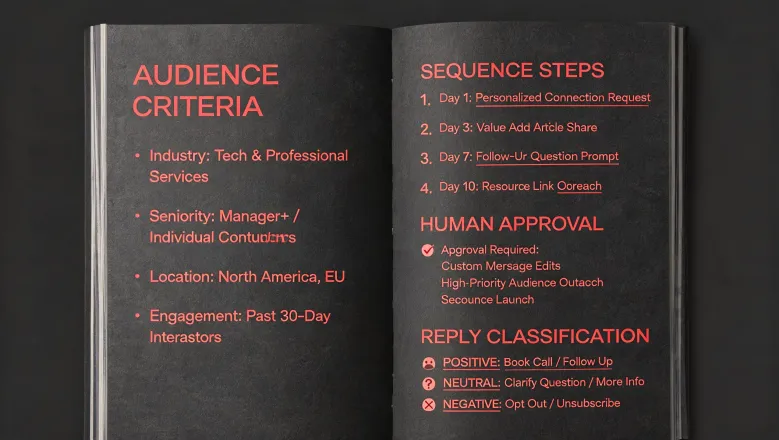
First, the okki go workflow for SDR teams collapsed the entire fetch-to-sequence process into one step. Sales Navigator export pulled through their enrichment layer, emails got verified inline, and the intent data was already attached by the time the contact hit the sequence. That single change removed about three-quarters of the manual hours my team was burning.
Second — and this is the part I almost didn't notice — the human-in-the-loop review step mattered more than I expected. The tool didn't try to replace the SDRs. It queued them for approval on personalization and sent them on. Roughly 90% were approved instantly. But that 10% the reps reviewed is what pushed our reply rate from under 2% back into a range we could actually forecast against.
This is the part where I'm supposed to quote some industry benchmark. I'll be honest: cold email reply rate benchmarks vary wildly by vertical, list source, and offer. I don't trust any single number. What I trust is that ours went from "we're embarrassed to look at this" to "this is defensible." I'd rather report our own trajectory than lean on a benchmark that may or may not apply to a mid-market B2B SaaS pipeline in 2025.
What I'd tell anyone running this evaluation now
I've only done this kind of tooling evaluation three times — CRM, sequencing, and now AI prospecting. I can't speak to enterprise-scale RevOps, and I've never managed a team of more than twenty. If you're at a 2,000-person company, some of this will look different.
But the framework holds up. When you're comparing prospecting tools, put these in your TCO column, not just the invoice:
- Time per seat per week spent on manual data work
- Verification overhead — every bounced email is a reputation hit that compounds
- Enrichment stitching cost — if you're paying three vendors to do what one waterfall does, you're paying three invoices and three integration risks
- Ramp cost — every additional tool your team has to learn is real onboarding time
- Forecast risk — if you can't trust your reply rate, you can't build a quota model on top of it
FTC advertising guidance requires that vendor claims be substantiated and not misleading (ftc.gov), and that's good for buyers — but it doesn't tell you what a tool will actually cost your team. That's your job.
The $99 quote on my spreadsheet wasn't wrong. It was just incomplete. Once I added up everything it was quietly charging us — hours, morale, forecasting risk, two SDRs who nearly quit — the number got honest. And the honest number was that we should've switched two months earlier.
My advice: don't run the unit-price spreadsheet. Run the TCO spreadsheet. It takes an extra afternoon. It saves a year.

Zainab Rahimi
Zainab Rahimi is an independent social and multichannel prospecting analyst covering LinkedIn automation, connection workflows, profile research, email discovery, social outreach, browser extensions, and coordinated touch sequences. She applies EU GDPR data-minimization principles while assessing invitation acceptance, reply rate, profile-match accuracy, rate limits, channel overlap, sequence spacing, opt-out handling, and account restriction risk. Her guides help sales teams compare automation approaches, build controlled workflows, and balance personalization, compliance, channel resilience, and sustainable prospect engagement.